




.webp)

Unexpected $34.49 Adobe Charge? 3 Steps to Recover Your Expired Student Discount
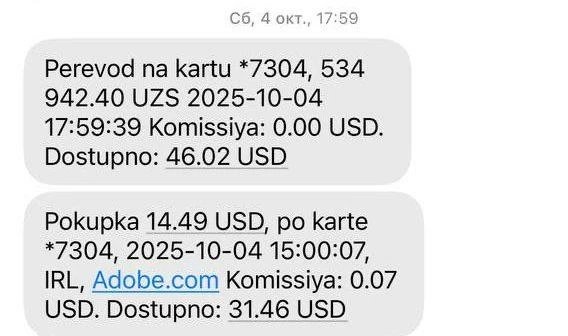
Picture this: It's the middle of the Spring 2026 semester, and you're pulling an all-nighter to finish your final project. You wake up the next morning, check your phone, and see a terrifying bank alert—Adobe just charged your credit card $34.49 (or sometimes a random $14.49 or even $59.99 out of nowhere).
For a broke college student surviving on part-time jobs and cheap ramen, this sudden bill is a disaster. You signed up last year for $19.99/month. Why did it suddenly jump or charge you an unknown amount? Don't panic, and definitely don't just accept the loss. If you know the rules, you can absolutely get every penny of that money back.
Figure: A common sight on Adobe forums—users shocked by unexpected auto-renewal charges like $14.49 or $34.49.
1. The Truth Behind the Hike: The "Year 1 Trap"
Adobe's pricing is essentially a carefully crafted funnel. When you happily clicked "Buy" a year ago, buried in the tiny grey fine print was a crucial detail: your initial price was strictly the introductory pricing for the first year. Once those 12 months end, the system automatically auto-renews at the standard rate (like $34.49/month for students)—without any upfront email warning. Worse, if you miss the cancellation window, you could be hit with an Early Termination Fee equal to 50% of the remaining contract.
2. Damage Control: 3 Steps to Recover Your Money
The sooner you act after seeing the charge, the better your chances. Follow these exact steps to claim your refund:
Step 1: Exploit the "14-Day Refund Window"
According to Adobe's official terms, you are entitled to a full refund if you cancel within 14 days of your initial order OR your annual renewal date. Log into your Adobe account, go to "Plans and payment," and click "Cancel plan." If you are within that 14-day window from the unexpected charge, the system will automatically process a full refund and waive any cancellation fees.
Step 2: The "Broke Student" Live Chat Script
If you missed the 14-day window, immediately open the Live Chat bubble on your account page. Bypass the bot to reach a human agent, and use this tested script:
"Hello, I just noticed an unexpected charge on my card. I am a university student struggling with rent and living expenses, and I simply cannot afford this price jump. I was not clearly notified of this auto-renewal increase. Could you please cancel my subscription and issue a full refund for this month? I really need this money for my groceries."
Customer service representatives are human, and they often have the authority to issue a full refund and waive the ETF as a "one-time exception" when you cite severe financial hardship.
Step 3: The Plan-Switching Loophole (Backup)
If the rep refuses, go back to your account dashboard and click "Change Plan." Downgrade your suite to the cheapest 20GB Photography Plan (around $9.99). This action legally resets your 14-day refund window. Wait a few hours for the system to update, log back in, and cancel the new plan for a full, penalty-free exit.
3. You Got Your Money Back... But What About Finals?
Getting your money back is a huge relief, but reality hits hard: your final projects are still due. Should you download a cracked version? Absolutely not—malware could wipe your hard drive right before finals. Should you go back and pay the expensive full price? Your wallet says no.
As a student on a depleted budget, you need a legit, genuine solution with zero trial-and-error costs and no annual contract traps.
💡 The Ultimate Student Hack: New Users Survive Finals for $1
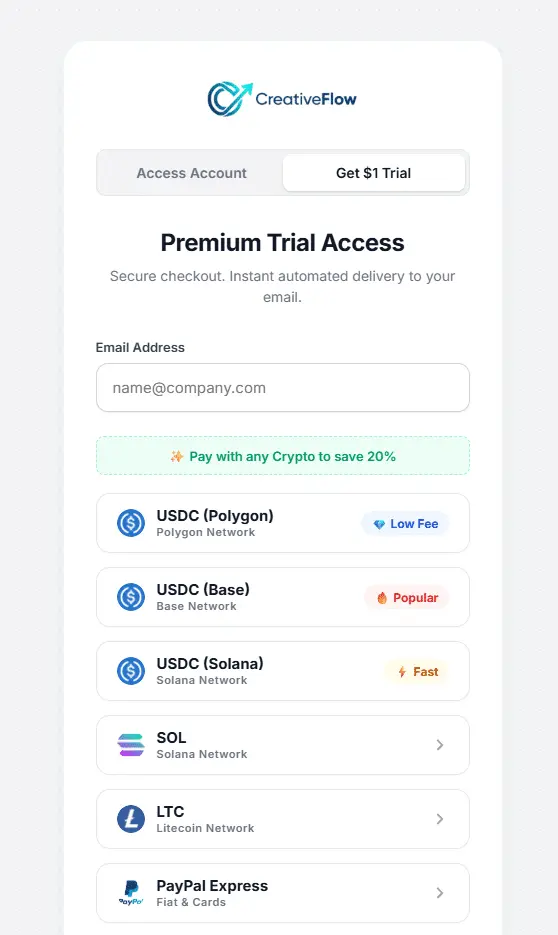
We offer genuine, independent Adobe licenses for as low as 1/5th of the official price. No annual contracts, absolutely no cancellation fees. As an exclusive offer for new users, you can spend just $1 (or only $0.80 if you pay with Crypto/USDT) to unlock a full 7-day trial of Creative Cloud Pro. Trade half a cup of coffee for the tools you need to ace your finals!
Figure: [New Users Only] Enter your email to start a 7-day CC Pro genuine license for just $1 (Crypto: $0.80).
⚠️ The Transparent Minor Trade-off
To achieve this extreme level of savings, our licensing model requires a minor compromise: you must re-verify your login once a week, and it does not include cloud collaboration storage (需接受每周重登等微小妥协,详情请看我们的《揭秘2026低价Adobe授权真实评测》). If you already save your assignments to a local hard drive or USB stick, this won't slow you down at all.
4. Frequently Asked Questions (FAQ)
- Q: Is the $1 trial available to everyone?
A: The $1 (or $0.80 Crypto) trial is strictly exclusive to first-time new users. It is designed as a risk-free way for new customers to test our genuine Pro license for 7 days. Limit one per new account. Existing users, please refer to our standard affordable pricing. - Q: Will I be automatically charged full price after the 7-day $1 trial ends?
A: Absolutely not. We operate on a strict prepay model. Once your 7 days are up, the access simply stops. There is zero auto-renewal unless you manually choose to buy more time. - Q: Can I use the new Firefly AI generative tools with this $1 trial?
A: Yes! You are getting an independent Pro license. It includes full access to genuine AI computing power and all desktop apps, completely legal and safe for your academic portfolio.
Escape Unexpected Charges and Save Your Grocery Money
Don't let expensive software drain your limited budget. Use the recovered money to buy real food! Spend just $1 ($0.80 via Crypto) to safely get through finals week with zero hidden fees and no corporate subscription hostage situations.
💡 New Users: Get 7 Days of Full CC Access for $1