



.webp)

2026 Latest Guide: How to Waive Adobe's 50% Cancellation Fee & Cancel Safely
With the comprehensive adjustment of Adobe's subscription prices in early 2026, many creators and designers trying to cancel their official subscriptions have encountered a frustrating "hidden trap"—a massive cancellation fee amounting to 50% of the remaining contract.
Why do you have to pay tens or even hundreds of dollars just to stop using the service? Today, we are going to expose Adobe's billing rules and share the latest, proven 2026 guide to canceling your subscription without paying the fee. More importantly, after successfully canceling, we will show you how to continue using genuine Adobe software at a much lower cost!
1. Why Does Adobe Charge Such a High Cancellation Fee?
When purchasing a subscription on the official website, many users simply choose the default "Annual plan, paid monthly" option.
This is exactly the trap! You might think you are buying a "monthly" plan that you can cancel anytime, but in reality, you are signing a one-year installment contract. According to Adobe's official terms:
- Cancel within 14 days: Full refund, no cancellation fee.
- Cancel after 14 days: You must pay a lump-sum cancellation fee of 50% of the remaining contract obligation, and your service will continue until the end of that month's billing period.
Faced with these unfair terms, do we just quietly pay up? Absolutely not.
2. 2026 Proven Methods: 3 Core Ways to Waive Adobe's Cancellation Fee
Method 1: Use the "Change Plan" Loophole (Most Recommended, 99% Success Rate)
This is currently the easiest method and doesn't require arguing with customer service. The core logic is: When you change to a new subscription plan, the 14-day refund window resets.
- Log into your Adobe account and go to "Manage Plan".
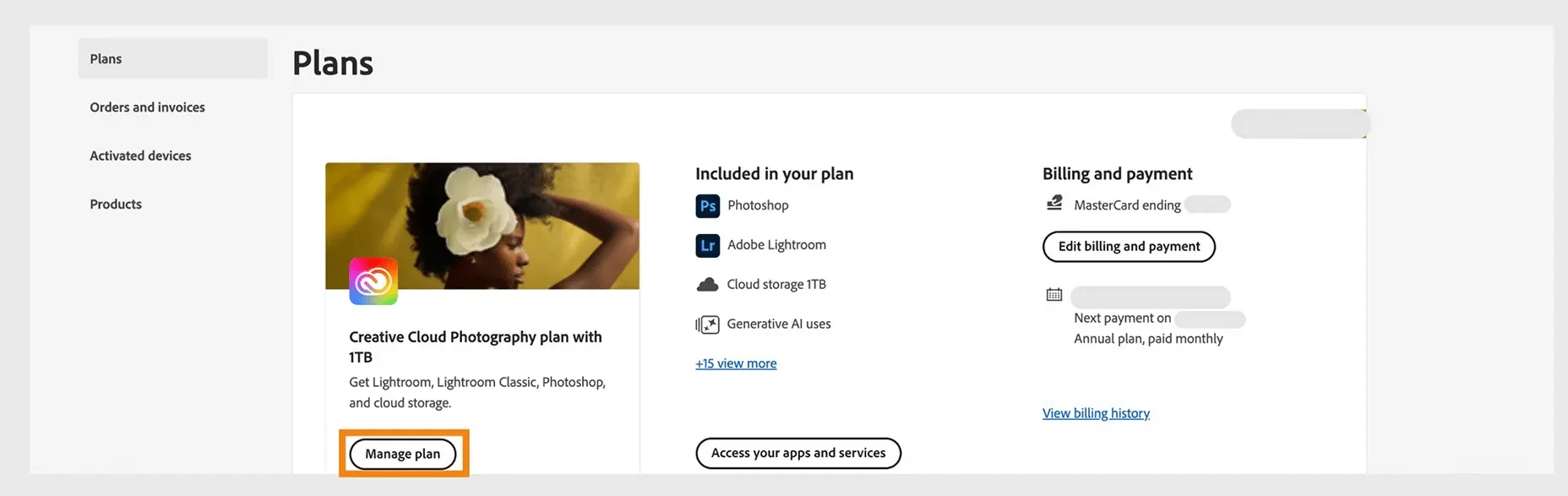
- Do not click cancel; instead, click "Change Plan".
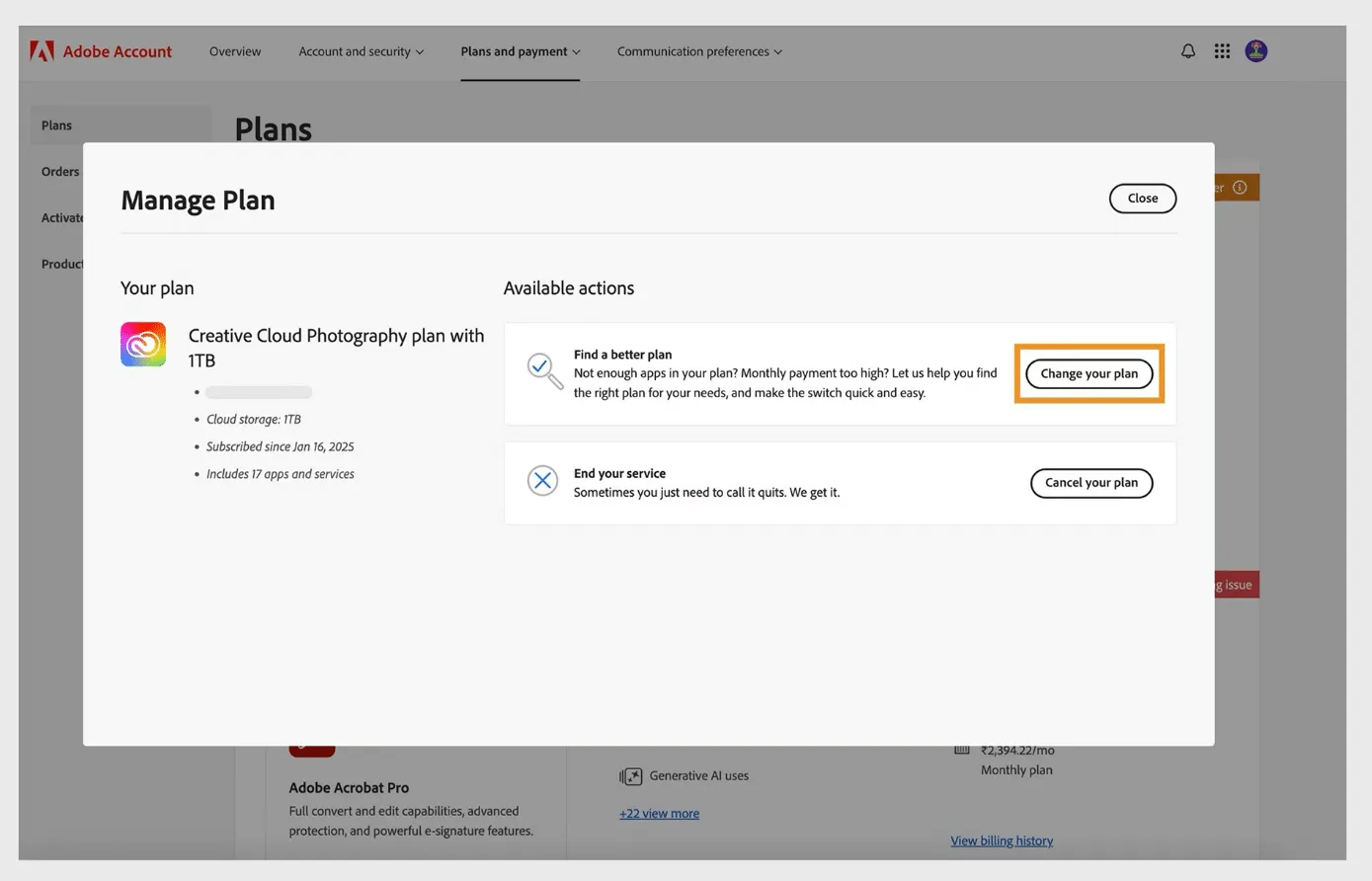
- Choose the cheapest available plan (e.g., standalone InCopy or the basic Photography plan) and confirm the change.
- Crucial step: Once the plan is successfully changed, wait 24 hours (to ensure the system is fully updated).
- Log back into your account and choose to cancel this "new plan" you just switched to.
- The system will now determine that you are within the "14-day refund period" for the new plan. Not only will there be no cancellation fee, but you will also get a full refund for the new plan!
Method 2: Live Chat "Hardship" Scripts
If you find the above steps tedious, you can contact Adobe's Live Chat. Adobe's customer service agents have the authority to waive your cancellation fee directly; the key is the reason you provide.
- High Success Rate Script: "I am a student and can no longer afford the increased subscription fee for 2026."
- Backup Script: "I recently lost my job/encountered financial difficulties. This cancellation fee is too heavy a burden for me. Please help me waive it."
Usually, to retain you, the agent will first offer two or three months of free service. If you firmly decline and insist on canceling, they will highly likely waive the fee for you.
Method 3: Lock/Change Credit Card (Not Recommended)
Some users simply freeze or replace the linked credit card so Adobe's billing fails. However, this poses legal risks and will result in your Adobe account being blacklisted. You won't be able to subscribe in the future, and your cloud files may be wiped out. This is only recommended as an absolute last resort.
3. After Canceling Successfully, How to Keep Using Genuine Adobe at a Low Price?
After successfully dodging the cancellation fee, congratulations on saving a large sum of money! But work must go on. What do you do without PS, PR, or AE?
Never download cracked versions!
Not only can cracked versions carry ransomware, but more fatally, Adobe's core productivity tools in 2026 fully rely on cloud AI computing power (such as Photoshop's Generative Fill and Premiere's AI Video Processing). Cracked versions absolutely cannot use these AI features, which will cause your work efficiency to be completely left behind by your peers.
Ultimate Solution: Choose Flexible, Affordable Genuine Licenses
Don't want to be tied down by official annual contracts? Don't want to bear high monthly fees? Get the most cost-effective genuine licenses on the web!
- Prices Beat the Official Site: Save on high markups and get the full Creative Cloud suite at a massive discount.
- 100% Genuine, AI Supported: Linked to your own independent account, perfectly supporting all 2026 latest AI features and cloud storage. Safe with zero risk of being banned.
- No Unfair Terms: No hidden annual commitments and no ridiculous cancellation fees. Buy it for as long as you need it—maximum flexibility and freedom.